
priorities
Productivity Coaching, Time Management Consulting and Leadership Coaching for business and nonprofits - get your most important work done. Collaborating with leaders and their teams to become more strategic, focused and productive. Leadership and Board Coaching, Strategic Planning Facilitation, Productivity Coaching and Time Management Consulting, Professional Speaker.
Productivity Coach, Productivity Consultant, Leadership Coach, Time Management Coach, Business Consulting, personal productivity, time management, nonprofit, board coach, collaboration, strategic planning, facilitation, change management, leading productive teams, project planning, board development, volunteer engagement, association management, workplace productivity, executive director.
-1
archive,tag,tag-priorities,tag-30,wp-theme-bridge,bridge-core-3.3.4.5,qode-page-transition-enabled,ajax_fade,page_not_loaded,,qode_grid_1200,footer_responsive_adv,qode-theme-ver-30.8.8.5,qode-theme-bridge,wpb-js-composer js-comp-ver-8.7.1,vc_responsive

priorities Tag

If your computer looks like your brain feels – 37 tabs open, all competing for attention – this one’s for you.

You start with good intentions: one quick check, one more thing to look up. Suddenly, you’ve got open tabs for work projects, travel plans, news, shopping, and maybe that recipe you’ll definitely make someday.

Each tab represents something unfinished—an open loop your brain keeps tracking. No wonder you feel distracted and overwhelmed.

Our Brains Weren’t Built for This Many Tabs

Neuroscience shows that our best thinking happens in the prefrontal cortex—the part of the brain responsible for decision-making, planning, and prioritizing. But it can only hold so much at once.

When too much comes at us—too many tabs, tasks, or worries—we overload. The thinking brain gives way to the emotional brain, triggering fight, flight, or freeze. Focus evaporates, anxiety rises, and even simple things feel hard.

When your computer crashes, you lose all those open tabs. When you crash, you lose all those thoughts and ideas. That’s why you need a system for offloading them—your task list. There’s hope (and help).

Pro Tips

  • For ideas:
    Capture them somewhere reliable—your task list, a Google Sheet shortcut, an email to yourself, or even a sticky note you’ll transfer later. Avoid random Notes apps if you never revisit them. Ideas are only useful if you’ll find them again.
  • For browser tabs:
    Add the action (and hyperlink) to your task list. Then close the tab confidently. You’ll know where to find it when you’re ready.

“Too Many Tabs” Looks Different for Everyone

Some tabs are digital. Others are mental or emotional. They sound like:

  • “I should reach out to that client.”

  • “I need to start that presentation.”

  • “I still haven’t scheduled that appointment.”

  • “I need to figure out what’s next for my business.”

Each open loop takes up mental bandwidth. The more tabs you keep open, the slower everything runs, and the more stuck you’ll be when you or your computer crashes.

Closing the Tabs

You don’t need to close every tab—just enough to free up cognitive space.

  1. Externalize what’s internal.
    Write down everything on your mind. Once it’s captured, your brain can relax. (Learn more in Chapter 9 of Productivity for How You’re Wired or search “task list” on my blog.)

  2. Decide what deserves to stay open.
    Keep what matters today; close the rest. Add hyperlinks to your task list for anything important.

  3. Match your “tab load” to your structure preference.
    If you need everything visible, organize your open tasks in one clear list. If clutter overwhelms you, pare it down to just what you need now.

  4. Give yourself permission to reboot.
    Step away, stretch, breathe, or declare “tab amnesty.” Close everything. With today’s search engines and ChatGPT, you can find it again if it’s important.

The Point Isn’t Perfection—It’s Clarity

Closing tabs isn’t about being perfectly organized. It’s about making space to think clearly and do your best work.

When you have too many tabs open—on your computer or in your mind—you’re not lazy or unmotivated. You’re simply overloaded.

Take a breath. Save what matters. Close what doesn’t. Give your brain the gift of focus.

What About You?

What’s one “tab” you can close – digitally or mentally – today to make room for focus and peace?


Feeling Overloaded? If you’ve got too many tabs open—on your screen or in your head—you’re not alone. I help leaders and professionals create clarity, structure, and focus by aligning how they work with how they’re wired.

Want to dive deeper into strategies for working smarter, not harder? Check out my book Productivity for How You’re Wired —available now on Amazon in print, eBook, and audio.

Or, if you’re ready for personalized support, let’s talk. Together we’ll design systems that actually stick and create a sustainable rhythm that works for you. Let’s connect – schedule your discovery call today.


Just because you can, doesn't mean you should. Be future focused. Remember the why not the what. Motivation follow action.

Here are some of my favorite thoughts on productivity. They aren’t what you typically hear, but they’ve helped me and my clients. I hope they’ll help you too!

Just because you can, doesn’t mean you should.

This is one of the hardest lessons to learn. We often think that because we can do something, we should just do it. But building in a pause and asking whether it’s in our best interest to say yes is a powerful shift. Here are some questions to consider when deciding if the answer should be yes:

  • If I say yes to this, what will I have to say no to in order to make time for it? Remember, time is finite. You can’t keep adding commitments indefinitely. Are you willing to give up time at the gym or working on a project that matters to do this?
  • Is there someone else who can do this well enough? Not only could it be a good opportunity for someone else on your team to learn a new skill, but it might also be better for you to stick to your high-value work and let someone else do this.
  • Will doing this help me achieve a long-term goal or intention? Look at your goals for the year. Does this action support them? If not, the answer is most likely NO.

Retraining your brain around this takes time—it’s a new way of thinking. 


It may be less about setting boundaries and more about considering the future result of saying yes.

This is what we call a “time horizon” issue. If you look at your calendar three weeks from now, it may seem like you have plenty of time, and you might believe you won’t need to compromise your boundaries to say yes. But is that truly the case? You know how often things pop into your life and take up time that you didn’t anticipate.

Ask yourself: How would you feel if you had to fit this event, action, or task into your calendar this week or today? Would you still say yes?  


When learning a new habit—remember the why, not just the what.

When we try to change something, our brain tends to push back. Doing something different— even if it’s for our benefit—can trigger the brain’s threat response, leading to fight, flight, or freeze. That’s not the ideal mental state for making lasting change.

When making a change, it’s natural to focus on the “what”: the specific steps to implement it. For example:

  • “I’ll go to the gym every Monday, Wednesday, and Friday morning before work.”
  • “I’ll do my daily planning with my coffee each morning.”
  • “Even though the report isn’t due until Friday, I’ll schedule time to work on it Monday.”

But what often happens? You know the answer! So try shifting your focus. Instead of just the “what,” consider the “why”:

  • “I know I will feel better physically and emotionally if I work out three times a week.”
  • “When I take five minutes to plan today’s tasks, I get more done, feel less stressed, and enjoy my free time more.”
  • “When I give myself time to write, pause, and revise, the quality of my work improves, and I feel more confident.”

Motivation follows action—not the other way around.

I often hear people say, “I just need more discipline.” But I believe discipline isn’t the key. How do you gain motivation? Simply—by taking action. Once you start, it feels good. Completing tasks feels even better. Success breeds success.

Remember, motivation follows action, not the other way around. This makes building habits easier. Give it a try: see if it’s motivation you need, not discipline.


A final note:

All these mindset shifts are valuable. But as we’ve discussed, trying to change too many things at once makes it harder to sustain those changes. My recommendation – pick one and test that for a few weeks.  Good luck! 


If you enjoy my blog, you’ll love the insights in my book, Productivity for How You’re Wired, available on Audible, in print, and as an ebook all on Amazon.

4 D's: Delegate, Delay, Delete, Do

Have you heard of the 4 D’s?  It’s a principle that has been circulating in my professional circles for years but has gained even more relevance in today’s workplace. Given the workload my clients face, there must be solutions beyond simply working harder and longer. Lately, I’ve been emphasizing the importance of the 4 D’s as a filtering tool to help prioritize tasks on their to-do lists.

Here’s what you need to know to help you use the 4 D’s to filter your tasks.  Look at your task list and for every single item on it ask yourself:

  • Can I delegate this?
  • Is this time-sensitive or can it wait?
  • What would be the consequences if I don’t do it?
  • Is this a priority in the coming week?

Delegate It

My favorite delegation quote is by Pierre Omidyar, the founder of eBay. He says that “five times 80% is much larger than 100% of me.”

Delegating is hard:

  • It takes time
  • It takes effort and planning
  • It takes patience
  • You have to follow up
  • Team members probably won’t do it as well as you at the beginning

But Delegating is Worth It:

  • If you’re doing someone else’s work, you aren’t doing your own work.
  • It improves the effectiveness of the entire team.
  • It provides opportunities for growth and drives engagement.
  • Best of all, delegating gets it off your plate.

My delegation process involves:

  1. Defining what to delegate.
  2. Identifying the right person for the task.
  3. Providing clear instructions.
  4. Maintaining open communication.
  5. Supporting the delegate while empowering them.
  6. Following up on delegated tasks.

If you can, delegate the task

Delay It

Not all tasks are of equal importance. To determine what can be delayed, consider:

  • The impact of postponing the task.
  • Who might be affected by the delay.
  • Whether approval is needed to delay the task.
  • If discussing the delay with someone is necessary.

Time is limited, so prioritizing tasks based on their impact and importance is helpful. If the task isn’t time-sensitive, consider delaying it.

Delete It

Ask yourself, “What would happen if I didn’t do this task?” Some tasks lose their importance over time or may no longer align with your goals or current situation. If a task is deemed non-essential, remove it from your list.

Do It

If doing something serves you, your goals, your business, or someone important to you and it is high impact then that’s a good reason to do it now.  Other reasons are the ones I suggest you use to help you prioritize your tasks – if you don’t do it in the next few days

  • You will miss a deadline
  • It will cost you money
  • You will let someone down
  • You will be embarrassed
  • You will let  yourself down

Productivity is about intentional action, so if a task is significant and time-sensitive, tackle it promptly to maintain efficiency. With intention, doing it now makes sense.  And that is what productivity is all about.


Unlock your potential with the upcoming audio version of Productivity for How You’re Wired on Audible! If you enjoy my blog, you’ll love the insights in my book, available now in print and as an ebook on Amazon. Don’t miss out—I’m excited to share these transformative strategies with you!

The Value of Systems

Some people love systems, while others resist them. Have you ever asked yourself why you have a system in place? We utilize them so we don’t have to reinvent the wheel every single day.

Most people strive for efficiency. This helps clear time for the tasks that need to be done, while still leaving room for the things we want to do. A useful tool for increasing our efficiency is a well-designed system.

What do you have a system for?

  • Getting ready for bed
  • Getting dressed in the morning
  • Paying bills
  • Establishing children’s bedtimes

These everyday tasks involve numerous steps, yet we perform them so frequently that they become routine. Initially, we need to think through the process, but after repeating it enough times, it becomes automatic. This is the process of learning and integrating new systems and methods.

What systems would be beneficial for you to develop, practice, and execute often enough to become second nature? Here are a few of my favorites:

Planning Today’s Work

  1. I review my calendar, check my emails for anything new, and look at my task list for high-priority items. Then, I assess how much time I have available for work.
  2. Based on this, I determine my tasks for the day. Sometimes I jot them down on a sticky note; other times, I work directly from my task list. It’s perfectly fine if it varies from day to day.
  3. What helps me the most is having a curated list of priorities to focus on each day. I strive to include only the work I can realistically complete. On days when I do this, I am often amazed by how much I accomplish.

New Client Onboarding

  1. I open my master Getting Started document and customize it with the specific needs of the client. I then save the document with the client’s name.
  2. Next, I open an email and use a pre-written template saved in my signature. I update the email with the client’s name, start dates, and materials needed, and add a personalized greeting. I attach the Getting Started document.
  3. I enter the client’s email address, hit send, and I’m done! This entire process takes just five minutes. I’m a bit embarrassed to share how quickly I can do this—I want my clients to feel special. Most of the time, the effort lies in the personalization.

Weekly Meal Planning

  1. I keep a running grocery list. Whenever I use an item up or get close to finishing it, I add it to the list.
  2. Before heading to the store (or ordering groceries), I plan what I’ll cook or eat for the week.
    1. My breakfasts tend to be repetitive. As long as I have eggs, fruit, and the ingredients for oatmeal and granola, I’m set.
    2. For lunch, I prefer leftovers from the previous night’s dinner. I also keep tuna fish packets, salad ingredients, and sliced turkey breast on hand—this is usually all I need.
    3. I enjoy cooking dinner a few nights a week as it helps me make healthier choices and serves as a great creative outlet. First, I look at my calendar to determine how many nights I can realistically cook. Then, I select recipes accordingly—usually around three. I try not to overdo it to avoid wasting food. I browse my collection of recipes (which I often change) saved in a three-ring binder or flagged in a favorite cookbook and write down the necessary ingredients on my grocery list. If an item isn’t available, I can figure out a substitute on the spot.
  3. I cook! Knowing I have ingredients for a few different meals gives me the flexibility to whip up whatever I’m in the mood for. However, I make it a priority to prepare fresh fish the same day I buy it.

From these examples, you can see that developing a system can apply to nearly anything. I bet you have numerous systems in your life that you don’t even realize.

Stop Reinventing the Wheel Consider applying this approach to the areas that challenge you. Can you identify one task that frustrates you and that you struggle to complete? Do you have a system for it? Probably not. Can you create one? Likely. If you’re having difficulty, please comment below, and I’ll be happy to share some ideas to help you get started.


Coming Soon to Audible: Productivity for How You’re Wired, print, ebook, and soon as an audio book, available on Amazon.

What if you could set yourself up to do your focused, deep, important work successfully?  What does it take for you to get into flow?  Why is it so hard to get started?

Deep focused work carries a fairly heavy cognitive load. To get results, you need to be fully present. That doesn’t just happen. Many productivity pros say it’s critical to do this work at the time your mind is sharpest. But THERE IS SO MUCH MORE! 

As important as it is to understand your body clock, it is equally, if not more important, to identify the conditions YOU need to be successful doing your Focus Work. Being specific and identifying and integrating these conditions will help you get into flow. 

What are Your Conditions for Success?

Timing

  • You don’t have to wake up early! Embrace your body’s natural rhythms and maximize your best times. If you are an early-bird who likes to wake early, great. However, if you’re a night-owl, don’t feel badly about it and don’t push yourself to be someone you’re not. The people who say “to be successful you have to wake up at 5 a.m.” are people who like to wake up at 5 a.m. 
  • If you do your best work at the crack of dawn, or 4 p.m., or 11 p.m., it doesn’t matter. What matters is that you own it and PLAN to do your Focus Work when you can get it done! 

Other Work

Do you need to jump in when your mind is clear and uncluttered, or do you need to clear the decks in order to focus? Consider the following:

  • Loose Ends – Do you need to tie up any loose ends that will take you off task prior to beginning your Focus Work?
  • Email – Are all important emails addressed? Would it be helpful to schedule email time before or after Focus Work to support turning it off during?
  • Social Media – Would it be helpful to schedule social media time before or after Focus Work to support turning it off during?
  • Information and Data – Do you have all the information you anticipate needing so you don’t have to stop as often? Every time you go to the internet to look something up, you are opening yourself up to the temptation to go off task. 

Audio Interruptions

  • Notifications – What if you turned off all notifications, pop–ups, and interruptions on your computer? There are apps that limit web–surfing and social media if needed.
  • Phone – Can you silence your phone or put it on do not disturb? Better yet, can you put it out of reach?

Environment

  • Digital Clutter – Can you close windows, apps, and other distracting technology?
  • Physical Clutter – Would you be less distracted if your workspace was cleared of clutter? 
  • Music – Would you be more attentive if you played music?
  • Location – Do you focus better in an environment where you won’t be easily interrupted, or in settings with background noise and activity?

Self–Care

  • Movement and Meditation
    • Will exercising or meditating before starting your Focus Work result in better outputs? (Test it!)
  • Sleep 
    • Are you rested? How much sleep do you need? Are you getting it?
    • What do you need to do to ensure enough sleep? Schedule bedtime? Limit screen time? Set a reminder that it’s time for lights out?
  • Nutrition and Hydration
    • What foods help you concentrate?
    • What foods give you brain fog?
    • Does coffee help or hurt? How much? With or without sugar?
    • Do you have healthy snacks or chewing gum handy to keep the brain online?

Breaks 

  • Will a walk, nap, or meditation support your outcome?
  • Are you more effective taking a break after a certain amount of time or would it be more effective for you to take a break after reaching a certain target in your work?
  • Is it helpful to schedule breaks using an app so you know you can’t stop working until the outside tool says you can?
  • Would you benefit from an app that tells you to get up and move?

Communication

  • How can you signal to your coworkers you shouldn’t be interrupted? 
    • Can you put a sign on your door or cubical? 
    • Can you wear headphones?
    • Can you inform your colleagues you are doing Focus Work and not to interrupt you unless it is really important?
    • Is there any good reason to NOT show your calendar as busy?


There are many variables to consider. The sooner you learn your personal conditions to do your important focused work, the better chance you have to actually do it!


This is an excerpt from Chapter 11 of my new book Productivity for How You’re Wired available on Amazon. Many templates are included via the time tools link discussed in the book.

Planning Facilitates Action

The most valuable thing about planning is that it forces you to slow down and think! There are lots of proverbs about planning:

  • People who plan like to plan but they don’t
  • We plan, God laughs.
  • Life is what happens when you’re busy planning.

And the famous Dwight D. Eisenhower quote “In preparing for battle I have always found that plans are useless, but planning is indispensable.

From a productivity perspective, planning is indispensable. Are plans useless? Probably not. The question is how to plan most effectively.

For some, identifying individual steps is enough. They gain the greatest benefit from thinking through the plan. Others benefit from regularly referring to the plan. Still others like to refer to the plan and document their progress along the way.

Planning project steps makes the execution so clear that your move into action is logical and easy.

Plan to Plan

Assuming that planning will happen without intention will set you up for not planning. The first step is to plan to plan, and that means adding the action of project planning to your task list. Then when it’s time to create your plan you can follow my easy 6-step process.

Ellen Faye’s 6–Step Project Planning Process

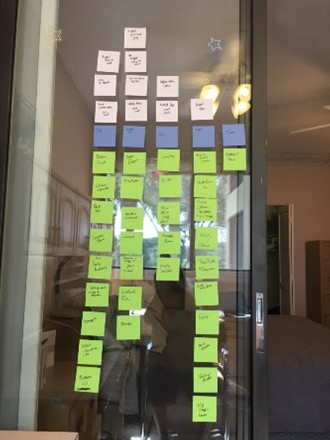
  1. Grab a stack of sticky notes – Write down each task associated with the project on its own sticky Don’t worry about writing them in any order, just write as fast as the ideas come to you. Be sure to use a new note for each individual task.
  2. Put the sticky notes in order – Consider what has to come before another step and the most logical order to do the work. During this process, you may think of extra steps. Create sticky notes for those steps and insert them into the process. Try organizing your notes on a vertical surface like a window or blank wall. You will be able to see how things relate and be able to easily move your notes around.

post it planning

NOTE: Sometimes these first two steps are enough. If others are involved, it’s time sensitive or very complex consider adding in steps 3 to 6.

  1. Assign a length of time to each step – Jot down on each sticky note your projection for how long the step will take, be it 15 minutes, an hour, or a week. When making your time estimates be sure to include thinking time, ramp–up time, interruption time, and break time. A good rule of thumb is to double your initial time projection.
  2. Assign due dates – If you have a deadline, start with the last sticky note and write the deadline on that note, then using the time projection, work from the last note backward. Date each note with the day it is due. If you can’t make the deadline as projected, look to see where you can adjust your timing, or if the deadline can be extended.

If there is no hard deadline, start on the first sticky note and assign due dates moving forward.

  1. Assign responsibility – If more than one person is working on the project, it’s helpful to identify who is responsible for each specific task and write it on sticky note.
  2. Place for easy reference – Transfer the information to your Priorities Task List, share with your team, copy to your planner, or simply leave the plan up on the wall.

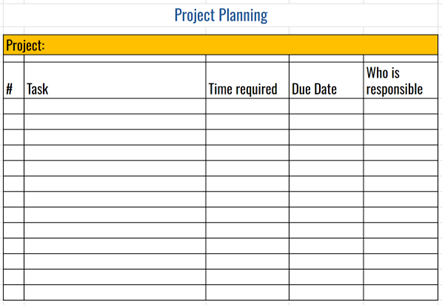
For some, the tactile act of writing out the tasks and moving them around on sticky notes brings the project to life. Others are more comfortable doing this electronically on a simple spreadsheet.

project planning template

Regardless of the tool, following the steps compels you to think things through, and that is the real value of planning.


This is an excerpt from Chapter 11 of my new book Productivity for How You’re Wired available on Amazon. The Project Planning Templates is included via the time tools link discussed in the book.